

Hi all, in my current role as platform engineer I’m maintaining and building with a very small team a scalable kubernetes infrastructure for multiple clients in many sizes and usecases. With this post I want to showcase our approach to solve scalability and extendability of our setup and how to follow the principals of fail fast / fail often to achieve a solid solution.
Historic growth and emerging challenges
Each good story starts with a bit of a retrospective at the start. We started back in 2022 with a pretty much blank canvas on how to build a scalable kubernetes environment for clients. After a small look-around and first playtests we settled on fluxcd. Out clients received an infrastructure repository that created the whole context for them. From external-dns up to certificate managent via cert-manager. Pretty much just in time after the first clients onboarded on this endeavor we realized that not all of them are relaxed when the need arises to maintain their configuration for the provided services and also their workload services all together. A first iteration of a cluster templater arose with the approach of an throw-away part for cluster base services and an area where our clients could place their workloads. The persepective shifted and it was kind of smooth sailing for a time. With the first steps done and everything running, a second thought issue came up. How do we update such a decentralized environment? Updating our templater was the obvious choise but with each new iteration there were changes within the configuration that needed to be explained to each project related team member. The communication overhead was enormous and we struggeled to maintain a high speed in ongoing changes. Our perspective shifted towards a centralized approach. A team split occured and a platform team was born. The maintainers of the internal kubernetes infrastructure and base context on it. The maintenance part of the kubernetes cluster went away from the dev teams that could now focus on maintaining their specific appliction workload. Updates, security patches, generic configurations were now centralized in one team that specifically focuses on this term. With this major organisational change came the productivity again. We also reevaluated our tech-stack this time and wanted an another aproach for our clusters. A switch to argocd was welcoming. Our cluster design is now topic of the next part in this blog post.
Control plane clusters are awesome
No one does simply rule multiple clusters from one instance! Hah. You can. ArgoCD provides an handy interface to join multiple clusters to an existing argocd instance and control them centrally. A general documentation is available here: argocd documentation cluster management. You simple need an active logged in session towards the target cluster and an active login via argocd cli to join the target towards your new instance. To achieve somewhat of an infrastructure as code approach we created a simple script to join clusters based on their name. This also determines if a cluster is joined towards the production environment or development environment.
NOTE: Every following snippet and code piece is focused around tanzu kubernetes clusters, but the approach is transferable to every other system.
But before we take a look at the script to detect all development clusters and join them at our development argocd control plane lets take a look how we define our clusters. A typical cluster definition may look like the following snippet.
---
apiVersion: run.tanzu.vmware.com/v1alpha3
kind: TanzuKubernetesCluster
metadata:
  name: armored-core-development
  labels:
    env: staging
    core-basic: enabled
    finops-basic: enabled
    monitoring-basic: enabled
    monitoring-medium: enabled
    security-basic: enabled
    storage-basic: enabled
  annotations:
    run.tanzu.vmware.com/resolve-os-image: os-name=ubuntu
It describes the bundles that should be applied. Currently we defined that the only required modules are core-basic and security-basic to fulfill minimal needs of each cluster. Technically it is possible to create an empty cluster with just the vmware tanzu stack ontop. After the successful creation of a tanzu kubernetes cluster the following script takes place to join it at the accordingly argocd control plane.
# Process each tanzu namespace to fetch and save TKC labels
while IFS= read -r namespace
do
  kubectl config use-context "$namespace"
  kubectl get tkc -n $namespace -o json | jq -r '.items[] | select(.metadata.labels and .metadata.labels["env"] == "dev") | [.metadata.name, (.metadata.labels | to_entries | map("--label \(.key)=\(.value)") | join(" "))] | @tsv' >> cluster.csv
done < namespaces.csv

# Add clusters to ArgoCD with specific labels
while IFS= read -r line
do
  cluster=$(echo "$line" | awk '{print $1}')
  label_string=$(echo "$line" | awk '{ $1=""; print $0 }' | sed 's/^ //')
  argocd cluster add $cluster $label_string --upsert
done < cluster.csv
With this script each cluster also receives specific labels which control which bundle is deployed on it. A bundle is a set of applications prepared by the platform team which will work in tandem to provide a service. A good example could be the security-basic bundle which contains services like falco, node-exporter, kyverno and otterize.
NOTE: As a short headup what the applications are that we deploy in our security-basic bundle. Falco is a cloud native security tool that provides runtime security across hosts, containers, Kubernetes, and cloud environments. Node-Exporter is a tool that exports health metrics of the specific node. Kyverno is a policy engine designed for Kubernetes. Otterize is a bundle of network related tools to easyly create and control network policies.
You may ask yourself “what are packages in your context?”. This question is perfect. A package is a bundle of multiple applications that we stinged together to provide a general service for our cluster customers. For example the monitoring-basic package contains serveral tools that may be useful to you as user. A shortend component list of our package contains the following content.
| Content / Application | Version | Implemented since |
|---|---|---|
| Prometheus CRD | 13 | v1.0 |
| Victoria Metrics Cluster | 0.14.11 | v1.0 |
| Infrastructure Alerts | v0.2 | v1.1 |
| Victoria Metrics Agent | - | v1.0 |
From a top to bottom perspective a simplified view of our deployments look like the following. A central control argocd deploys multiple packages towards client clusters and keep track of changes on these. Updates of these components are managed from one single instance and not managed in multiple clusters on their own. Each client cluster also receives their own argocd that allows them to interface with their own cluster and deploy applications based on their needs.
This enables us to keep our base context away from the client workloads and provide a clean interface for our clients.
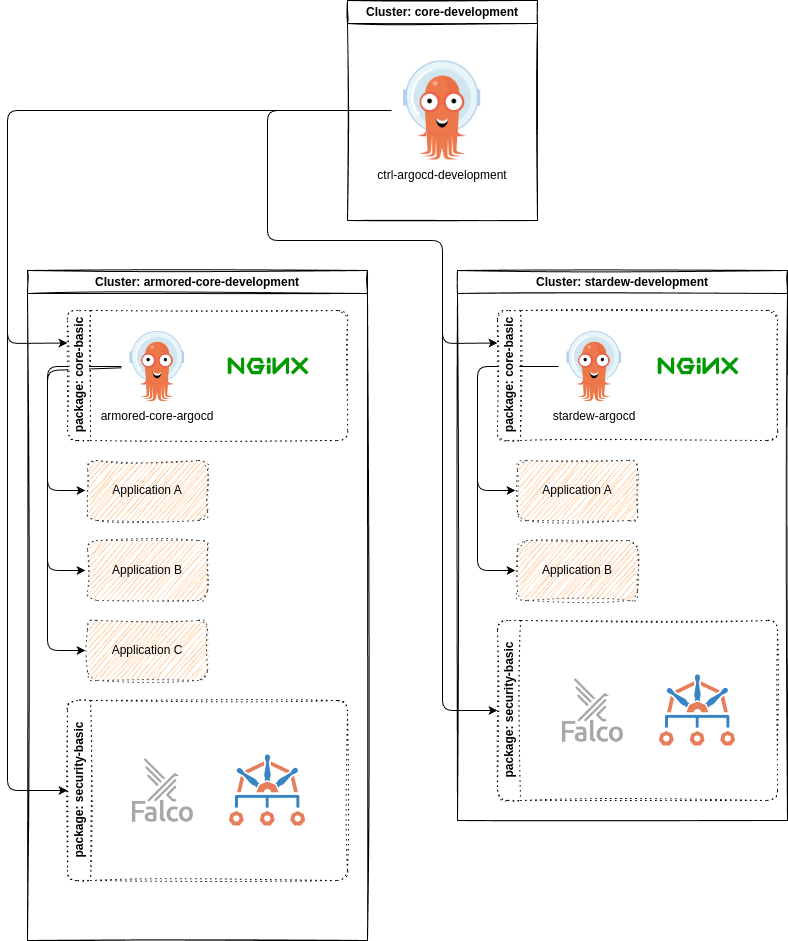
After each cluster is deployed and joined to a central argocd instance, we simply needed to configure the services as desired by most clients or development teams. To ease up usage we decided that it may be best to seperate our values into two parts. A well-known part that can be publically available and a secret part that contains values that may be related to a onpremise environment, confidental or just not to be shared publically.
This sparked the creation of an publically available kubernetes service catalog in which our umbrella charts reside and provide an extendable space for changes to other thrid party helm charts. This also provided us with an easier way to share a common configuration accross all kubernetes clusters in different hosting locations.
NOTE: What is an umbrella chart? An umbrella chart is a helm configuration that wraps around one-to-many existing charts and extends them configuration-wise or template-wise.
Building these is straight forward. Simply create a default helm chart yaml and extend it with a dependencies block in which you configure your charts to pre-configure or extend them. A good example is our umbrella chart for our victoria-metrics-operator deployment found here
apiVersion: v2
name: victoria-metrics-operator
version: 1.0.0
description: This Chart deploys victoria-metrics-operator.
dependencies:
  - name: victoria-metrics-operator
    version: 0.37.0
    repository: https://victoriametrics.github.io/helm-charts/
Each cluster that applies this chart comes with a preconfigured values file which contains the minimal setup for our environment. The values file can be found here.
The approach to split the generic preliminary configuration of the actual environment specific configuration enabled us to keep the actual environment required part rather small. The victoria-metrics-operator overlay for example is the following snippet:
victoria-metrics-operator:
  image:
    repository: pullproxy.corp.local/hub.docker.com/victoriametrics/operator
  env:
    #-- available env variables found here: https://docs.victoriametrics.com/operator/vars.html
    - name: VM_VMALERTDEFAULT_CONFIGRELOADIMAGE
      value: pullproxy.corp.local/ghcr.io/jimmidyson/configmap-reload:v0.11.0
    - name: VM_VMAGENTDEFAULT_CONFIGRELOADIMAGE
      value: pullproxy.corp.local/ghcr.io/prometheus-operator/prometheus-config-reloader:v0.64.1
    - name: VM_VMALERTMANAGER_CONFIGRELOADERIMAGE
      value: pullproxy.corp.local/ghcr.io/jimmidyson/configmap-reload:v0.11.0
  tolerations:
    - key: "nodetype"
      operator: "Equal"
      value: "platform"
      effect: "NoSchedule"
  affinity:
    nodeAffinity:
      requiredDuringSchedulingIgnoredDuringExecution:
        nodeSelectorTerms:
        - matchExpressions:
          - key: nodetype
            operator: In
            values:
            - platform
Last but not least there was the need to configure argocd to use multiple repositories. This can easly be achieved via a multi source block like shown in the following snippet.
NOTE: Some parts of this snippet are minimized to focus on the acutal content. A broader documentation is found here
apiVersion: argoproj.io/v1alpha1
kind: ApplicationSet
metadata:
  name: victoria-metrics-operator
  namespace: argocd
spec:
  generators:
    - clusters:
        selector:
          matchLabels:
            env: dev
            monitoring-basic: enabled
        values:
          branch: development
    - clusters:
        [..minimized to focus..]
  template:
    [..minimized to focus..]
    spec:
      project: bootstrap
      sources:
        - repoURL: "git@git.corp.local/platformteam/service-value-repo"
          targetRevision: main
          ref: valuesRepo
        - repoURL: git@git.corp.local/mirror/kubernetes-service-catalog.git
          targetRevision: ""
          path: "./monitoring/victoria-metrics-operator"
          helm:
            releaseName: "victoria-metrics-operator"
            valueFiles:
              - "values.yaml"
              - "$valuesRepo/cluster//monitoring/victoria-metrics-operator/values.yaml"
      [..minimized to focus..]
Let’s examine this snippet together. The applicationset generates us within the control plane argo multiple applications according to the generators block. There are serveral matchers that check for labels on cluster connections that contain a flag for our monitoring-basic package. Through this approach it is easier for us to decide which cluster gets which components. Following the generators block is the describing template that indicates how the generated argo applications should work like.
Only open question is still - how to managed all values required for an increasing amount of kubernetes clusters? We answered this with a “custom templater”. The next chapter describes our quick journey in this topic.
One templater to rule them all
Based on our setup described in the first chapter - scaling our infrastructure easly is our main priority and target. Handling all value files for each application and cluster is impossible by hand. We needed to create our own simple templater.
First prototypes were done in simple bash with envsubst so you just needed to configure for each cluster a dedicated environment file and replace each variable in all template files accordingly. It worked. Quite well to be fair, but was limited to basic tasks. It simply lacked the comfort to configure all clusters in an extendable structured manor.
To enable us we took a step back and looked around. At this time one team member had experience with jinja and we went on with prototyping in that direction. After a short while our first templater in python with jinja was done.
The python side is rather simple. Take a complex yaml structure, check it against a schemata to validate inputs, if everything seems ok translate the input into a map within python, check for template files, replace jinja templates with values of map and as last step write new file to outdir.
The most fun part is the following code block, everything else is rather basic python magic.
configfile = any
    try:
        with open(config_file_path) as configfile:
            configfile = yaml.load(configfile, Loader=yaml.FullLoader)

        # validate config file against schema
        validated_config = config.config_schema.validate(configfile)

        # add timestamp for creation time
        validated_config["timestamp"] = datetime.date.today()

    except SchemaUnexpectedTypeError as e:
        sys.exit(e.code)
    except SchemaError as e:
        sys.exit(e.code)
    except Exception as e:
        sys.exit(e.code)

    # load templates and environment variables
    env = Environment(loader=FileSystemLoader(searchpath=templates_path),
                      extensions=["jinja2_getenv_extension.GetenvExtension", "jinja2_base64_filters.Base64Filters"])

    # Delete generated directories
    shutil.rmtree(os.path.join(work_dir, "cluster"),
                  ignore_errors=True, onerror=None)

    # Look for templates
    templates = [x for x in env.list_templates() if x.endswith('.tpl')]

    # Process Cluster files
    platform_templates = [x for x in templates if x.startswith(
        'cluster')]

    # Process Cluster templates
    template_files(validated_config, platform_templates,
                   work_dir, env, True)
This part looks for .tpl files and templates them with the values from our validated_config. A typical template looks like the following snippet.
victoria-metrics-operator:
  image:
    repository: {{defaults.registry}}/hub.docker.com/victoriametrics/operator
  env:
    #-- available env variables found here: https://docs.victoriametrics.com/operator/vars.html
    - name: VM_VMALERTDEFAULT_CONFIGRELOADIMAGE
      value: {{defaults.registry}}/ghcr.io/jimmidyson/configmap-reload:{{cluster.monitoring.victoriametricsoperator.jimmydysonimagetag}}
    - name: VM_VMAGENTDEFAULT_CONFIGRELOADIMAGE
      value: {{defaults.registry}}/ghcr.io/prometheus-operator/prometheus-config-reloader:{{cluster.monitoring.victoriametricsoperator.promconfigreloadimagetag}}
    - name: VM_VMALERTMANAGER_CONFIGRELOADERIMAGE
      value: {{defaults.registry}}/ghcr.io/jimmidyson/configmap-reload:{{cluster.monitoring.victoriametricsoperator.jimmydysonimagetag}}
  tolerations:
    - key: "nodetype"
      operator: "Equal"
      value: "{{cluster.monitoring.victoriametricsoperator.toleration.nodetype}}"
      effect: "NoSchedule"
  affinity:
    nodeAffinity:
      requiredDuringSchedulingIgnoredDuringExecution:
        nodeSelectorTerms:
        - matchExpressions:
          - key: nodetype
            operator: In
            values:
            - {{cluster.monitoring.victoriametricsoperator.toleration.nodetype}}
Each time a change is done within the config.yml a workflow starts that templates the whole configuration for each cluster. This enables us to keep the drift between our configuration and the actual applied configuration close to zero for the most time. There are still workarounds to skip the continous integration steps for direct changes or testing new releases. A nightly run does also reapply the actual configuration and removes the drift.
Through this rather simple templating solution we’re able to scale up to 30 clusters with a small team of two to three persons.
Conclusions
In this rather lengthy blog post, we’ve seen how we started our platform adventure and how we also created our scalable and centralized configuration management system through argocd in combination with a custom templater. We discussed the challengenes that arose managing multiple clusters and their various needs and requests. By creating a simple templater in python and jinja, we were able to reduce the complexity of configuring each cluster. I’ll hope that this experience writeup will be useful for others facing similar challenges and encourage you to explore.
Further considerations
Of corse there are further considerations. ArgoCD is defintly an excellent tool but maybe something new fits better, fills other needs, let’s us explore new ways to solve our issues? While being on KubeCon EU 2024 I met creator of Sveltos and I like the project. Sadly I didn’t evaluate it yet to check if an another pivot of our stack may be required to achieve even better performance, time-to-market, ease in scalability. Or are our needs best catered for with ArgoCD? Time will tell. An other change that is definitly needed is to replace our old hacked-together python templater into something more viable. Due to some limitations of our currently working templater and some good relaxing evenings last year I worked on YART to create my own templater which is more flexible. Some fresh air for our dusty groundwork may be a nice way to ease things up.